Bulk erase CD-RWs and DVD-RWs with Mac OS X Terminal
One of the advantages of Philips’ DVP642 DVD player is its ability to use re-writable CDs and DVDs. Makes it easy to test various encoding programs and settings. Or if you miss an episode of CSI and want to grab it off the ‘net, just burn it, watch it and erase it. There’s no need to burn coaster after coaster of standard CD-Rs.
The adverse side-effect of that approach however, is that you’ll soon find yourself with stacks upon stacks of used CD-RWs and DVD-RWs, discs that will have to be erased on an ad-hoc basis using Disk Utility whenever you need to burn something new.
Fortunately, Mac OS X 10.3 (Panther) and later includes a command line tool that will keep asking for discs to erase until you quit the program. The tool itself is a snap to use and will greatly ease the effort of keeping a few blank re-writable discs around.
To access it, open Terminal (in Utilities folder). Type the following line at the prompt:
drutil bulkerase quick
Fix it with D-Vision: Make problem AVIs work on DVP642
Suppose you’ve got yourself an AVI file. It looks great when you preview it on your Mac, but is utterly rejected when you play it on your DVP642. Obviously, there’s something in the file that the player doesn’t like.
The picture flickers, the colors aren’t right, the resolution isn’t supported, or maybe it just doesn’t play at all.
It could be that the file uses an incompatible codec or was encoded using unsupported options, such as QPEL or GMC.
Don’t worry though. All is not lost; that file can be made playable by a piece of free software.
If I haven’t mentioned it before, D-Vision is a very useful program for a Mac-based video encodista to have on hand. It’s essentially a graphic wrapper for mencoder and mplayer, giving easy access to advanced encoding options. Not only does the program create AVIs, but it features a number of useful tools for manipulating AVI and MPEG files.
There’s one for splitting AVIs, one for joining them, one adding an audio track and more. But the tool we’re interested in the the "Re-encoding" tool.
Here’s how to take that troublesome video and make it play nice with your DVP642.
Reference: Burning Discs for DVP642
So you’ve managed to create an AVI file. Congratulations, now what are you going to do with it? While you could leave it on your hard drive and view it with VLC, the whole point of these exercises is to get your videos into the DVP642 and onto a television screen. And we do that by burning a disc.
My player has accepted every type of disc I’ve thrown at it (not literally thrown, of course): CD-R, CD-RW, DVD-R and DVD+R. It usually has to think a bit longer about DVD+Rs, but once it’s done, it works flawlessly. The only discs I haven’t tried are 3-inch mini-CDs (what’s the point?) and Dual Layer DVD-R (still expensive). Even so, I have read that the player has some difficulty with DL discs, so be warned.
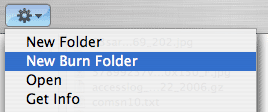
Burning a disc for the player is relatively straightforward and easy. You don’t even need any special software; Mac OS X can do it natively. The process is simple in Tiger (10.4):
1) Create a New Burn Folder
2) Drag your AVI file(s) to said folder.
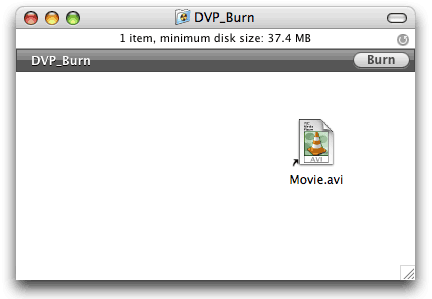
3) Click Burn and you’re good to golden.

Handbrake: let’s talk performance
In my last post, I laid out, step by step, the process to create a DVP642-compatible AVI file using Handbrake. Now let’s talk about performance.
By performance I mean two things: speed and quality. How fast will Handbrake encode your video? How good will the picture look when it’s done?
I’ll save quality for a future post; for now, I want to talk about speed.
DVP642 Quick Tip: Adding audio tracks
If you have an existing AVI file that you know works in your player and you wish to add more audio tracks (your own MST3k performance maybe? or perhaps a commentary?), make sure that all your tracks are the same format (MP3 or AC-3) and the same bitrate.
Don’t try to cut corners and reduce the final file size by thinking that you can get away with reducing the bitrate of spoken commentary tracks and the like. The DVP642 requires audio tracks embedded in AVIs to be the same bitrate. Otherwise, not only will it not switch to the secondary tracks, giving you only silence, but it will also not switch back to the original. You’ll have to stop and restart your video to get it back.
So remember, identical formats and bitrates and your player will happily switch between them.
To embed additional audio into an AVI, try D-vision. FFmpegx claims to be able to do it, but that feature hasn’t worked in a while.
The Quickest, Easiest Way to Create a DivX AVI for DVP642

Procedure
Source
DVD or VIDEO_TS folder
Tools
Difficulty
Easy
By far the easiest way to render a fully functional .avi (DivX) file that will work on the DVP642 without complaint is to use Handbrake to encode the file. There is a caveat, however: Your original video must either be a DVD disc (or disc image) or a properly authored VIDEO_TS folder.
Greetings and Welcome
For all the Mac’s sophistication at creating and editing videos (via iMovie, Final Cut Pro, etc), it is decidedly lacking in the “hobbyist tools” for video conversion department in comparison to Windows. In particular, tools for creating and editing videos (avi files) for Philips DVP642 have been notably limited.
Thus, on this site, I hope to present a Mac user-centric view of authoring content for the Philips DVP642 DVD player. I decided to put this site together after about a year of fiddling with the technologies involved, having to devise many of my own solutions, since information for the Mac OS X user is largely missing from the internet.
I plan to focus on testing many strategies for creating compatible videos using a number of different programs and methods, reporting on my results while focusing on speed, quality and ease of creation.
And while my efforts are directed at providing solutions to Mac users, I will not limit myself to Mac software exclusively. Mac software will be my primary focus, however the transition to Intel has opened a new door to video transcoding via programs like Parallels and Boot Camp that allow Mac users to utilize Windows programs with acceptable performance.
It should be noted though, that at the time of this writing (August 2006), the DVP642 has largely become obsolete compared to newer DVD players with greater capabilities (the DVP5960 for example). However, the installed base for the player is significant and I’m sure not everyone is rushing to upgrade, even at the new players’ modest prices.
The Setup
In order to guage which methods will work on various hardware configurations, each encoding workflow discussed on this site will be conducted on the Mac hardware at my disposal:
- 1.87GHz Intel CoreDuo iMac (stock hard drive, 1.5GB ram)
- Dual 2.0GHz PowerMac G5 (stock hard drive, 2GB ram)
- 1.25GHz PowerBook G4 (stock drive, 512MB ram)
The source material used in these demonstrations is chapter 19 from the Star Trek: Nemesis DVD. For all its failings as a film, I chose this particular video because of its mixture of action sequences, still shots, bright scenes, dark scenes and color gradients. Plus, the chapter is only 5 minutes 59 seconds long, which will help speed the testing along.
About
For all the Mac’s sophistication at creating and editing videos (via iMovie, Final Cut Pro, etc), it is decidedly lacking in the “hobbyist tools” for video conversion department in comparison to Windows. In particular, tools for creating and editing videos (avi files) for Philips DVP642 have been notably limited.
Thus, on this site, I hope to present a Mac user-centric view of authoring content for the Philips DVP642 DVD player. I decided to put this site together after about a year of fiddling with the technologies involved, having to devise many of my own solutions, since information for the Mac OS X user is largely missing from the internet.
I plan to focus on testing many strategies for creating compatible videos using a number of different programs and methods, reporting on my results while focusing on speed, quality and ease of creation.
And while my efforts are directed at providing solutions to Mac users, I will not limit myself to Mac software exclusively. Mac software will be my primary focus, however the transition to Intel has opened a new door to video transcoding via programs like Parallels and Boot Camp that allow Mac users to utilize Windows programs with acceptable performance.
It should be noted though, that at the time of this writing (August 2006), the DVP642 has largely become obsolete compared to newer DVD players with greater capabilities (the DVP5960 for example). However, the installed base for the player is significant and I’m sure not everyone is rushing to upgrade, even at the new players’ modest price.